
Module 1 of 13
Breakdown reporting at the line
The operator reports a stop in plain terms and gets the first safe steps at once.
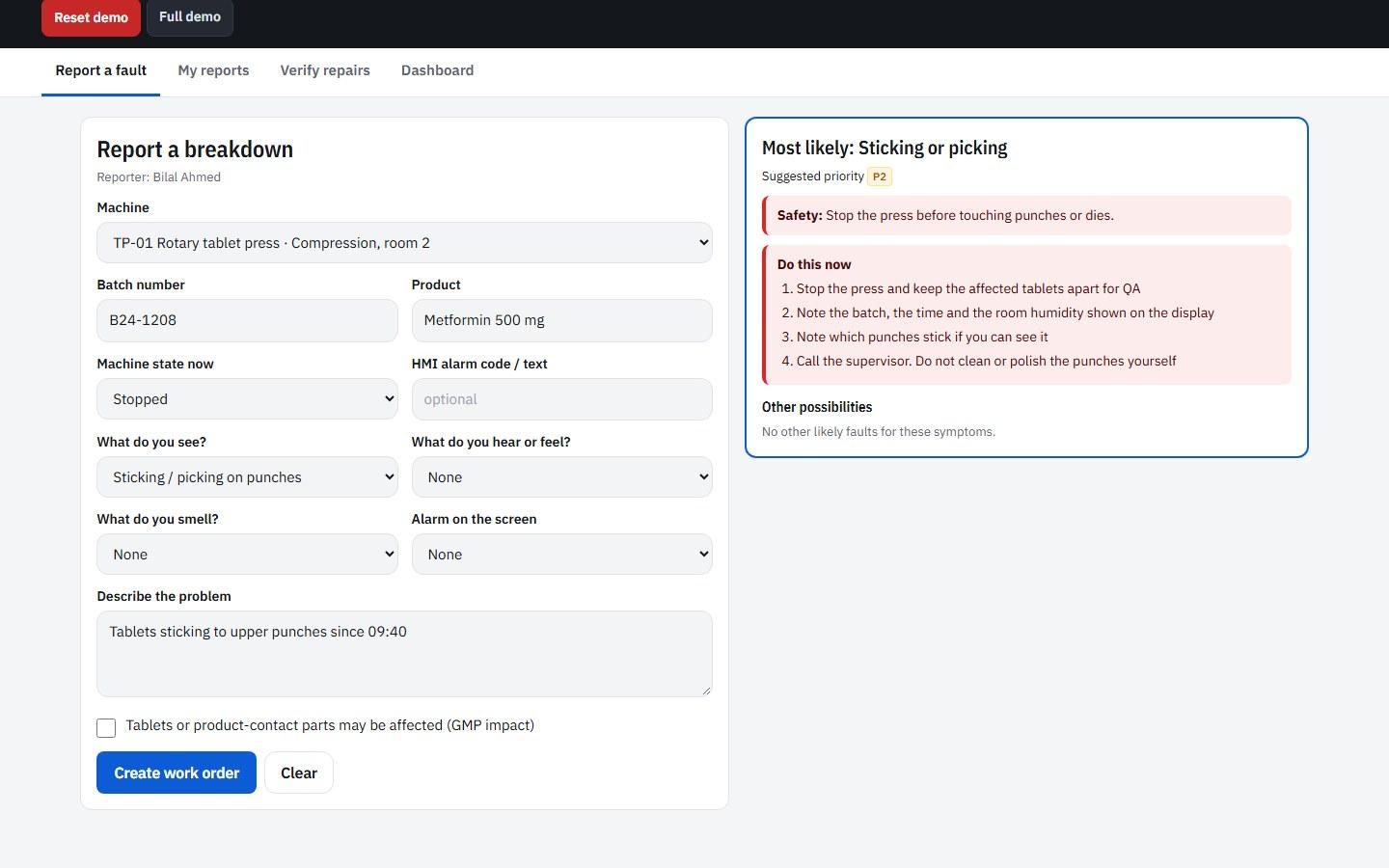
What it does
When a machine stops or misbehaves, the operator picks the machine and describes the fault with simple dropdowns by sense: what they see, what they hear or feel, what they smell, and the alarm shown. Each list has an "Other" option for anything not on it. As the choices are made, a live diagnosis appears with "Do this now" steps for the operator. The operator records the batch and product on the line and ticks whether the fault may have a GMP impact.
The steps
- 1Pick the machine, for example TP-01 rotary tablet press.
- 2Choose what you see, hear or feel, smell, and the alarm. Use "Other" if nothing fits.
- 3Read the live diagnosis and carry out the "Do this now" steps.
- 4Enter the batch and product, and tick GMP impact if the fault may touch the product.
- 5Send the report. Operations is told at once.
What each role sees
- Line operator
- The form, the live diagnosis and the "Do this now" steps.
- Operations manager
- The new report waiting for approval, with batch, product and GMP tick.
Follow one breakdown end to end.
The demo needs no login. Switch roles at the top and take TP-01 from the stop to the signed report.