
Module 5 of 13
Guided repair for technicians
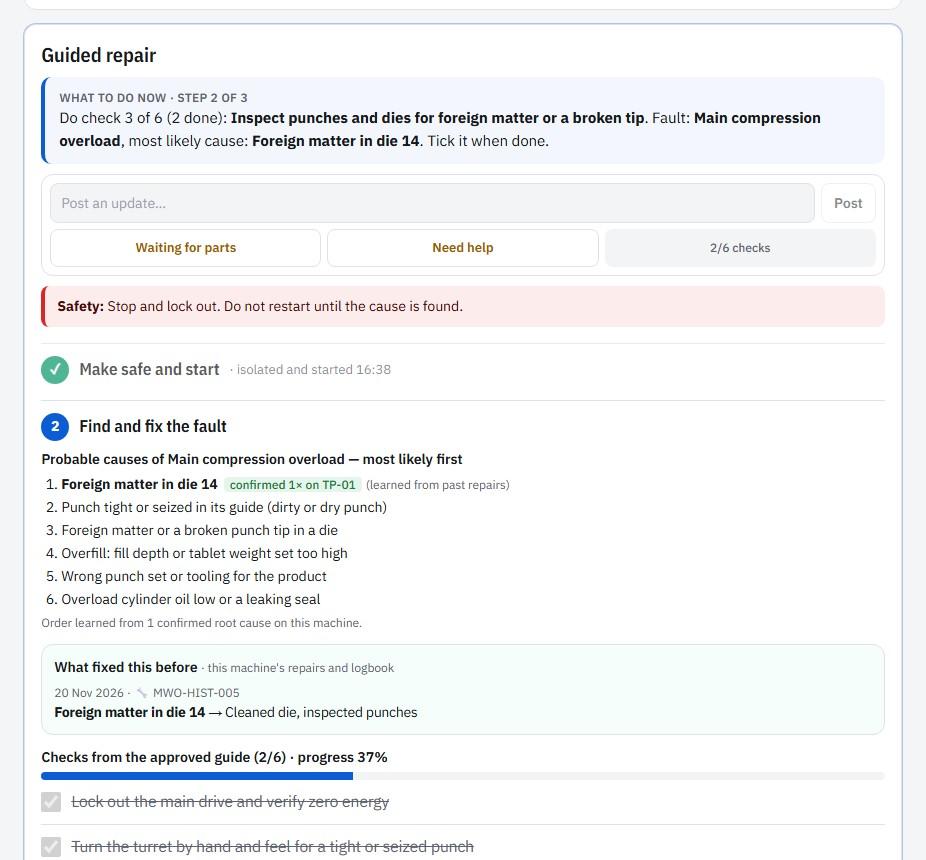
A "What to do now" bar and three steps: make safe, find and fix, close out.
What it does
The technician's job screen always shows what to do now. The repair runs in three steps: make safe (isolation and lockout/tagout), find and fix with checks, and close out. Progress and the job's stage update on their own as steps are done, so nobody has to phone for news. If parts are missing the technician marks the job as waiting for parts; if they need help they ask for it; if the job needs another trade they return it to the maintenance manager.
The steps
- 1Make safe: isolate the machine and confirm lockout/tagout.
- 2Find and fix: work through the checks and record what was found.
- 3Close out: record cause, fix and prevention, then hand back for verification.
What each role sees
- Technician
- The "What to do now" bar, the three steps and the checks.
- Maintenance manager
- Progress and stage as they change, and calls for help.
- Operations manager
- Where the repair stands.
Follow one breakdown end to end.
The demo needs no login. Switch roles at the top and take TP-01 from the stop to the signed report.